
Preguntas frecuentes sobre TYMO AIRHYPE LITE GRIS/PLATA
Preguntas frecuentes relacionadas con el producto
Preguntas frecuentes sobre TYMO AIRHYPE LITE GRIS/PLATA
Artículos en esta sección
1. ¿Cómo mejora la calidad de construcción del TYMO AIRHYPE LITE la experiencia del usuario?
2. ¿Qué es único en el diseño del botón del TYMO AIRHYPE LITE?
3. ¿Puede el TYMO AIRHYPE LITE manejar eficientemente el peinado de cabello grueso?
4. ¿Son necesarios accesorios adicionales para peinar con el TYMO AIRHYPE LITE?
5. ¿Cuál es el nivel de ruido del TYMO AIRHYPE LITE comparado con los secadores tradicionales?
6. ¿El TYMO AIRHYPE LITE recuerda configuraciones personalizadas?
7. ¿Qué hace que el TYMO AIRHYPE LITE sea cómodo para usar durante períodos prolongados?
8. ¿Qué tan rápido puede secar mi cabello el secador de pelo TYMO AIRHYPE LITE?
9. ¿Vale la pena invertir en el secador de pelo TYMO AIRHYPE LITE?
10. ¿Qué diferencia al TYMO AIRHYPE LITE de los secadores de pelo comunes?
11. ¿Cuántas configuraciones de calor y velocidad ofrece el secador de pelo TYMO AIRHYPE LITE?
12. ¿El secador de pelo TYMO AIRHYPE LITE es adecuado para todo tipo de cabello?
13. ¿Es fácil de mantener y limpiar el secador de pelo TYMO AIRHYPE LITE?
14. ¿El secador de pelo TYMO AIRHYPE LITE soporta voltaje dual para viajes internacionales?
15. ¿Cuál es la longitud del cable del secador de pelo TYMO AIRHYPE LITE?
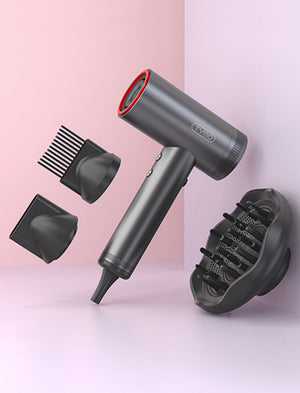
16. ¿Qué accesorios se incluyen con el secador de pelo TYMO AIRHYPE LITE?
17. ¿Dónde puedo conseguir el difusor y la boquilla peine para mi TYMO AIRHYPE Lite?
18. ¿Los accesorios para el secador de pelo TYMO AIRHYPE también son compatibles con el AIRHYPE Lite?
19. ¿Cuál es la diferencia entre el secador de pelo TYMO AIRHYPE y el AIRHYPE Lite?
20. ¿El secador de pelo TYMO AIRHYPE LITE viene con garantía?
21. ¿Qué tan rápido se calienta el secador de pelo TYMO AIRHYPE LITE?
22. ¿Cómo funciona el accesorio en el secador de pelo TYMO AIRHYPE LITE?
23. ¿Es el secador TYMO AIRHYPE LITE adecuado para viajar?
24. ¿El uso del TYMO AIRHYPE LITE dañará o resecará mi cabello?
25. ¿Puedo usar el TYMO AIRHYPE LITE GREY en países fuera de los Estados Unidos?
26. ¿Es el TYMO AIRHYPE LITE adecuado para cabello dañado y grueso (incluyendo cabello natural)?
27. ¿El secador TYMO AIRHYPE LITE tiene garantía?
28. ¿Es ruidoso el TYMO AIRHYPE LITE?
29. Al considerar la potencia del secador, ¿cuántos vatios usa el TYMO AIRHYPE LITE?
30. ¿Cómo limpio correctamente mi secador TYMO AIRHYPE LITE?
31. ¿Puedo ajustar la configuración del TYMO AIRHYPE LITE para cabello delicado?
32. ¿Cuál es la duración de vida del secador TYMO AIRHYPE LITE?
33. ¿Es el secador TYMO AIRHYPE LITE ligero para viajar?
34. ¿Qué tipo de estilos puedo lograr con el TYMO AIRHYPE Lite?
35. ¿Qué tan fácil de usar es el secador TYMO AIRHYPE LITE para no profesionales?
36. ¿El secador TYMO AIRHYPE LITE tiene un botón de disparo frío?
37. ¿Por qué mi TYMO AIRHYPE LITE solo sopla aire frío, o por qué solo emite aire caliente?
38. ¿Puedo usar el TYMO AIRHYPE LITE SLIVER en países fuera de los Estados Unidos?
39. ¿Cuáles son las diferencias entre los modelos TYMO AIRHYPE LITE SILVER y AIRHYPE LITE GREY?
¿Cómo mejora la calidad de construcción del TYMO AIRHYPE LITE la experiencia del usuario?
Diseñado con un diseño robusto pero ligero, el TYMO AIRHYPE LITE ofrece durabilidad sin peso, creando una experiencia de peinado premium y cómoda.
El TYMO AIRHYPE LITE cuenta con botones de estado sólido intuitivos con indicadores visuales, ofreciendo un ajuste sin esfuerzo de calor y velocidad para una experiencia de usuario superior.
Sí, el potente flujo de aire del TYMO AIRHYPE LITE garantiza un secado rápido y efectivo, perfecto para usuarios con cabello grueso, ofreciendo un rendimiento de calidad de salón incluso a temperaturas más bajas.
Aunque funciona eficazmente por sí solo, hay accesorios adicionales para el TYMO AIRHYPE LITE disponibles para personalizar tu rutina de peinado y mejorar tu experiencia con accesorios especializados.
Diseñado para un funcionamiento silencioso, el TYMO AIRHYPE LITE ofrece un potente poder de secado mientras minimiza el ruido, asegurando un ambiente de peinado más agradable.
La función de memoria inteligente del TYMO AIRHYPE LITE retiene tus configuraciones preferidas de temperatura y velocidad de aire, agilizando tu proceso de peinado para usos futuros.
Diseñado pensando en la ergonomía, la construcción ligera del TYMO AIRHYPE LITE minimiza significativamente la tensión en brazos y hombros, convirtiéndolo en una opción cómoda para sesiones de peinado prolongadas.
El secador TYMO AIRHYPE LITE está diseñado para la eficiencia, reduciendo significativamente el tiempo de secado en comparación con los secadores tradicionales. Los usuarios comúnmente experimentan una reducción en su rutina de secado de 15-20 minutos a considerablemente menos, mejorando la eficiencia de tu rutina.
¡Absolutamente! El secador TYMO AIRHYPE LITE no solo acelera los tiempos de secado, sino que también cuenta con un diseño ligero y múltiples configuraciones, ofreciendo un valor y rendimiento excepcionales, a menudo superando a competidores de mayor precio como Dyson.
A diferencia de los secadores típicos, el TYMO AIRHYPE LITE cuenta con un motor sin escobillas de alta velocidad de 110,000 RPM que acelera los tiempos de secado. También incorpora un avanzado sistema iónico que reduce eficazmente el frizz y la electricidad estática, dejando tu cabello suave y brillante.
El TYMO AIRHYPE LITE ofrece cuatro niveles de calor y tres velocidades, permitiéndote personalizar tu experiencia de secado según tu tipo de cabello y necesidades de peinado.
Sí, el TYMO AIRHYPE LITE es versátil y efectivo para todo tipo de cabello, ya sea fino, grueso o rizado, asegurando que todos puedan lograr su estilo perfecto.
Sí, mantener el TYMO AIRHYPE LITE es sencillo gracias a su filtro de aire extraíble en la entrada de aire, que se puede limpiar fácilmente para mantener el rendimiento óptimo y prolongar la vida útil del aparato.
El secador TYMO AIRHYPE LITE soporta voltaje dual limitado y puede usarse en EE. UU., Canadá, Reino Unido y UE con los modelos específicos para cada país. Sin embargo, es importante señalar que el modelo para EE. UU. es compatible solo con tomas de 100-120V y no debe usarse en regiones con diferentes estándares de voltaje sin la conversión adecuada. Esto garantiza una operación segura y evita daños al secador al viajar internacionalmente.
El TYMO AIRHYPE LITE viene equipado con un cable de 8.2 pies de largo, brindándole amplia flexibilidad y alcance mientras peina su cabello.
El TYMO AIRHYPE LITE incluye una boquilla alisadora, que ayuda a reducir el frizz y la estática mientras seca, mejorando su experiencia general de secado de cabello.
Las boquillas difusora y peine para el TYMO AIRHYPE LITE están disponibles para compra por separado en nuestra tienda, permitiéndole personalizar aún más su experiencia de secado de cabello.
Las boquillas alisadora y difusora son compatibles tanto con el TYMO AIRHYPE como con el AIRHYPE Lite. Sin embargo, la boquilla peine para el AIRHYPE no encaja en el AIRHYPE Lite. Una boquilla peine específica para el AIRHYPE LITE está disponible por separado en nuestra tienda.
Los secadores de cabello TYMO AIRHYPE y AIRHYPE LITE satisfacen diferentes necesidades y preferencias. El TYMO AIRHYPE está construido con una carcasa robusta de aluminio, cuenta con una pantalla LCD que muestra la temperatura, velocidad y configuraciones iónicas, y viene con múltiples accesorios incluyendo una boquilla peine, difusor y boquilla alisadora, lo que lo hace ideal para estilistas profesionales y usuarios con alta demanda. También incluye una bolsa portátil para mayor comodidad.
En contraste, el AIRHYPE LITE está diseñado con una carcasa de plástico premium ligera y no tiene pantalla LCD. Se enfoca en funciones esenciales con dos luces indicadoras para la temperatura y la velocidad, e incluye solo una boquilla alisadora. Este modelo es perfecto para el uso diario, ofreciendo una experiencia de secado de alto rendimiento en un paquete más compacto y asequible, haciendo del TYMO AIRHYPE LITE una excelente opción para quienes son nuevos en la tecnología avanzada de secado de cabello o buscan una opción potente pero sencilla para el uso diario.
Sí, el TYMO AIRHYPE LITE cuenta con una garantía de 1 año desde la fecha de compra, garantizando su satisfacción y tranquilidad.
El TYMO AIRHYPE LITE se calienta casi al instante, permitiéndole comenzar a secar su cabello inmediatamente sin un período de calentamiento.
Los accesorios para el TYMO AIRHYPE LITE utilizan un sistema magnético, simplificando el proceso de cambio al encajarlos y desacoplarlos fácilmente, proporcionando un ajuste seguro sin necesidad de girar o atornillar.
Absolutamente, el diseño compacto y ligero del TYMO AIRHYPE Lite lo hace ideal para viajar, ofreciendo un rendimiento potente que supera a la mayoría de los secadores de hotel incorporados.
No, el TYMO AIRHYPE LITE está diseñado con características para proteger su cabello del daño, asegurando un secado efectivo incluso en la configuración de calor más baja mientras mantiene la suavidad natural de su cabello y evita el secado excesivo.
El TYMO AIRHYPE LITE GREY es compatible con EE. UU., Canadá, Reino Unido y la UE. Cada uno está adaptado a los estándares de voltaje locales. Por lo tanto, es crucial usar el modelo correcto correspondiente a los estándares de voltaje regionales: el modelo estándar de EE. UU. solo en EE. UU., y el estándar de la UE en países europeos.
¡Absolutamente! El TYMO AIRHYPE LITE está específicamente diseñado para todo tipo de cabello, incluyendo cabello dañado, grueso o natural con textura afro. Cuenta con tecnología iónica avanzada que emite 100 millones de iones negativos y ofrece configuraciones versátiles de calor y velocidad (4 calor y 3 velocidades) para asegurar un proceso de secado suave pero efectivo que minimiza el daño potencial.
Sí, el TYMO AIRHYPE LITE viene con una garantía de un año desde la fecha de compra. Además, ofrecemos una política de devolución sin complicaciones de 30 días, permitiendo devoluciones sin preguntas.
El TYMO AIRHYPE LITE está diseñado con un motor sin escobillas silencioso y una carcasa aislante de ruido, reduciendo el ruido del viento en un 80%. Opera a un nivel de ruido comparable al de una conversación normal o una aspiradora doméstica, asegurando una experiencia de secado más silenciosa.
El TYMO AIRHYPE LITE funciona a 1500W, situándolo dentro del rango eficiente típico de secadores de alta calidad, proporcionando un excelente poder de secado sin un consumo excesivo de energía.
Hay dos formas de mantener su TYMO AIRHYPE LITE en óptimas condiciones:
1. Para la autolimpieza:
●Encienda y luego apague el secador de pelo.
●Mantenga presionado el botón de flujo de aire durante más de 5 segundos para activar la función de autolimpieza, que dura 8 segundos y luego el dispositivo se apagará automáticamente.
2. Para limpieza manual:
●Siempre desenchufe el secador primero.
●Gire para quitar la cubierta del filtro.
●Desmonte la jaula del filtro y use un cepillo suave para limpiar cualquier pelusa.
●Reensamble colocando la jaula del filtro y girando la cubierta a su posición original.
Sí, el TYMO AIRHYPE LITE viene con múltiples configuraciones de calor y velocidad para adaptarse a tipos de cabello delicados, asegurando un secado suave y efectivo.
Con mantenimiento regular y uso adecuado, el TYMO AIRHYPE LITE está diseñado para ofrecer un rendimiento duradero durante años.
Sí, el diseño del TYMO AIRHYPE LITE es compacto y ligero, lo que lo convierte en un compañero de viaje perfecto sin sacrificar potencia.
El TYMO AIRHYPE LITE es adecuado para una variedad de estilos, desde alisados suaves hasta rizos voluminosos, gracias a sus configuraciones versátiles de calor y su boquilla alisadora.
El TYMO AIRHYPE LITE está diseñado con controles intuitivos y un diseño ergonómico, lo que lo hace muy fácil de usar para usuarios no profesionales en casa.
Sí, incluye un botón Cool Shot para ayudar a fijar su estilo y añadir una ráfaga de aire frío para los toques finales.
Si su TYMO AIRHYPE LITE solo sopla aire frío, asegúrese de que el botón Cool Shot no esté activado accidentalmente, ya que esta función cambia el flujo de aire a temperatura ambiente. Si el dispositivo solo emite aire caliente, verifique si el botón Cool Shot está atascado o si hay un problema con la configuración.
En ambos casos, también es recomendable verificar que el dispositivo no se esté sobrecalentando, ya que puede cambiar automáticamente a aire frío para evitar daños si se calienta demasiado. Si continúa experimentando problemas, consulte el manual de usuario o contacte al soporte de TYMO para asistencia.
El TYMO AIRHYPE LITE SILVER está diseñado para ser compatible con los enchufes eléctricos de EE.UU., Canadá, Reino Unido y algunos países de la UE. Es importante conocer y respetar los requisitos de voltaje específicos de cada país para garantizar el uso seguro de su dispositivo. El modelo para EE.UU. está diseñado exclusivamente para uso dentro de Estados Unidos, mientras que el modelo para la UE debe usarse en Europa.
Los modelos TYMO AIRHYPE LITE SILVER y GRIS son idénticos en funcionalidad y rendimiento, con la diferencia en su color. Además, una versión especial del modelo SILVER que incluye tres accesorios adicionales está disponible exclusivamente para clientes en Estados Unidos. Estos accesorios ofrecen mayor versatilidad para diferentes preferencias de peinado. Para clientes fuera de EE.UU., el modelo SILVER viene sin estos accesorios adicionales.








Can we see more videos of th TYMO Pro Curl on short hair. Short as in chin length. And see it used on short layered hair please.